Ajuste preciso
Redimensiona cualquier imagen por ancho, alto o píxeles exactos, manteniendo siempre las proporciones correctas.

Pulsa el botón Compartir y luego «Añadir a pantalla de inicio».
Ajusta tus imágenes al tamaño adecuado para cada uso.
Redimensiona imágenes a dimensiones de píxeles exactas o por porcentaje — con bloqueo de relación de aspecto y nitidez opcional. Sin subida de archivos.
Redimensiona cualquier imagen por ancho, alto o píxeles exactos, manteniendo siempre las proporciones correctas.

Las imágenes redimensionadas se mantienen claras y definidas. Perfectas para miniaturas, banners o fotos de producto.
Todo se procesa en tu navegador. Las imágenes no se suben ni salen nunca de tu dispositivo.
Impulsado por el propio navegador para obtener resultados instantáneos. Sin esperas ni procesos en servidor.
Cualquier persona que necesite imágenes del tamaño correcto — sin apps, sin subidas.
Prepara imágenes con dimensiones exactas antes del despliegue. Establece un ancho máximo y deja que la herramienta gestione las proporciones — sin editor de imágenes.
Redimensiona imágenes destacadas y miniaturas para cumplir los requisitos de tu CMS antes de subirlas. Dimensiones consistentes mejoran el diseño y la velocidad de página.
Estandariza el tamaño de las fotos de productos para un diseño de tienda limpio y consistente. Las imágenes redimensionadas cargan más rápido en móvil y mejoran la experiencia de compra.
Exporta recursos con dimensiones específicas para handoff, mockups o presentaciones. Usa el modo de tamaño exacto para cumplir requisitos precisos de píxeles en cada ocasión.
Ajusta imágenes a los tamaños recomendados de Instagram, X, LinkedIn y más — sin recortes ni distorsiones. Rápido, privado y solo en el navegador.
Prepara imágenes para campañas de email, presentaciones y documentos internos. Redimensiona a tamaños estándar en segundos sin instalar software.
No. Todo el procesamiento ocurre en tu navegador de forma local. Tus archivos nunca abandonan tu dispositivo ni se envían a ningún servidor.
Tracelyx Resize ofrece cuatro modos: Ajustar al tamaño máximo, Solo por ancho, Solo por alto y Tamaño exacto. Cada modo bloquea automáticamente la proporción, excepto en dimensiones exactas.
El redimensionado en sí no reduce la calidad — solo cambia las dimensiones. El resultado se mantiene lo más nítido posible usando el renderizado nativo del navegador.
Sí. Usa el modo Tamaño exacto e introduce ancho y alto. También puedes desactivar el bloqueo de proporción si necesitas un redimensionado no proporcional.
Sí, completamente gratuito. Sin cuenta, sin límites de uso y sin marcas de agua.
Esta herramienta procesa una imagen a la vez con control total sobre las dimensiones. Para redimensionar varios archivos en lote, usa la herramienta Batch.
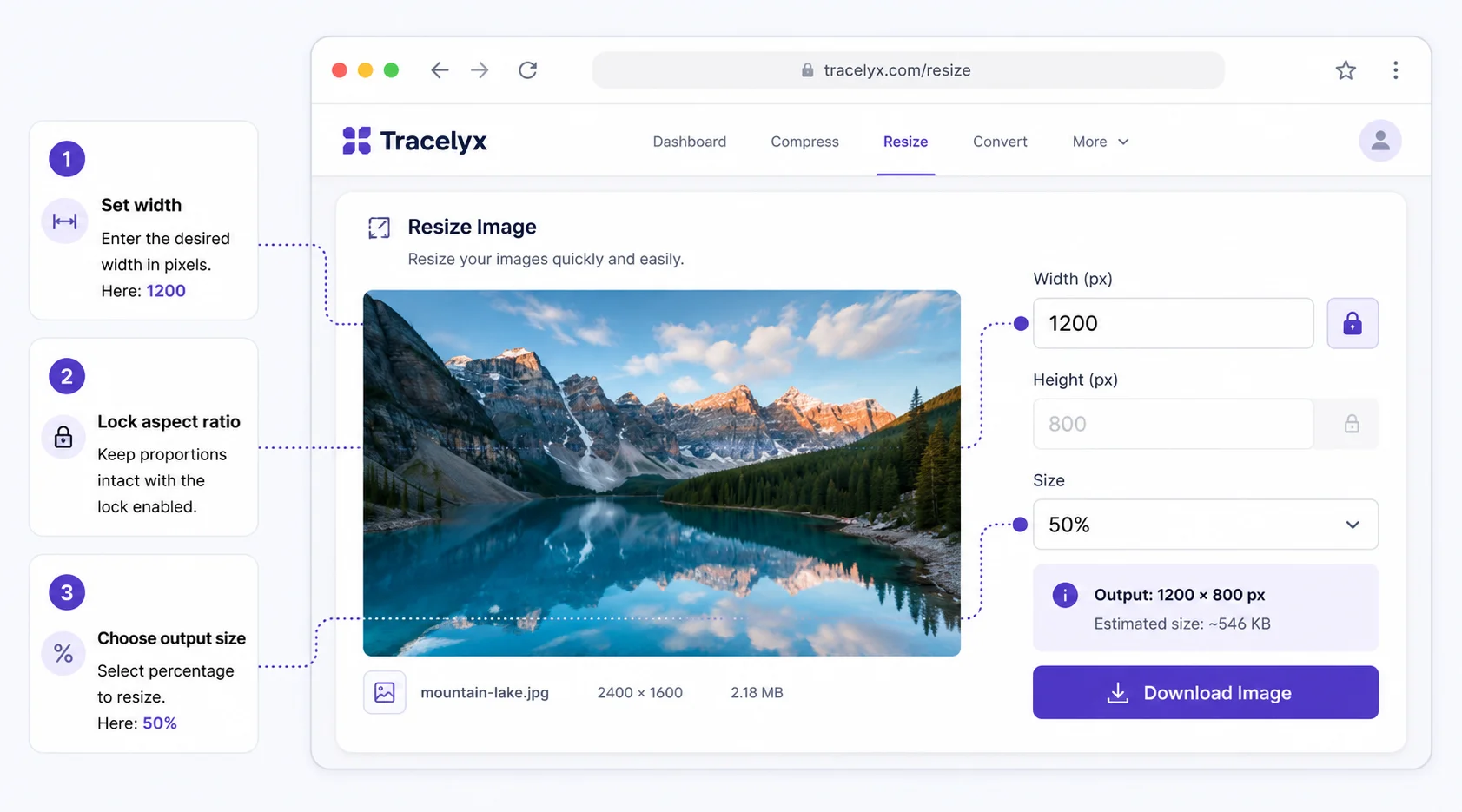
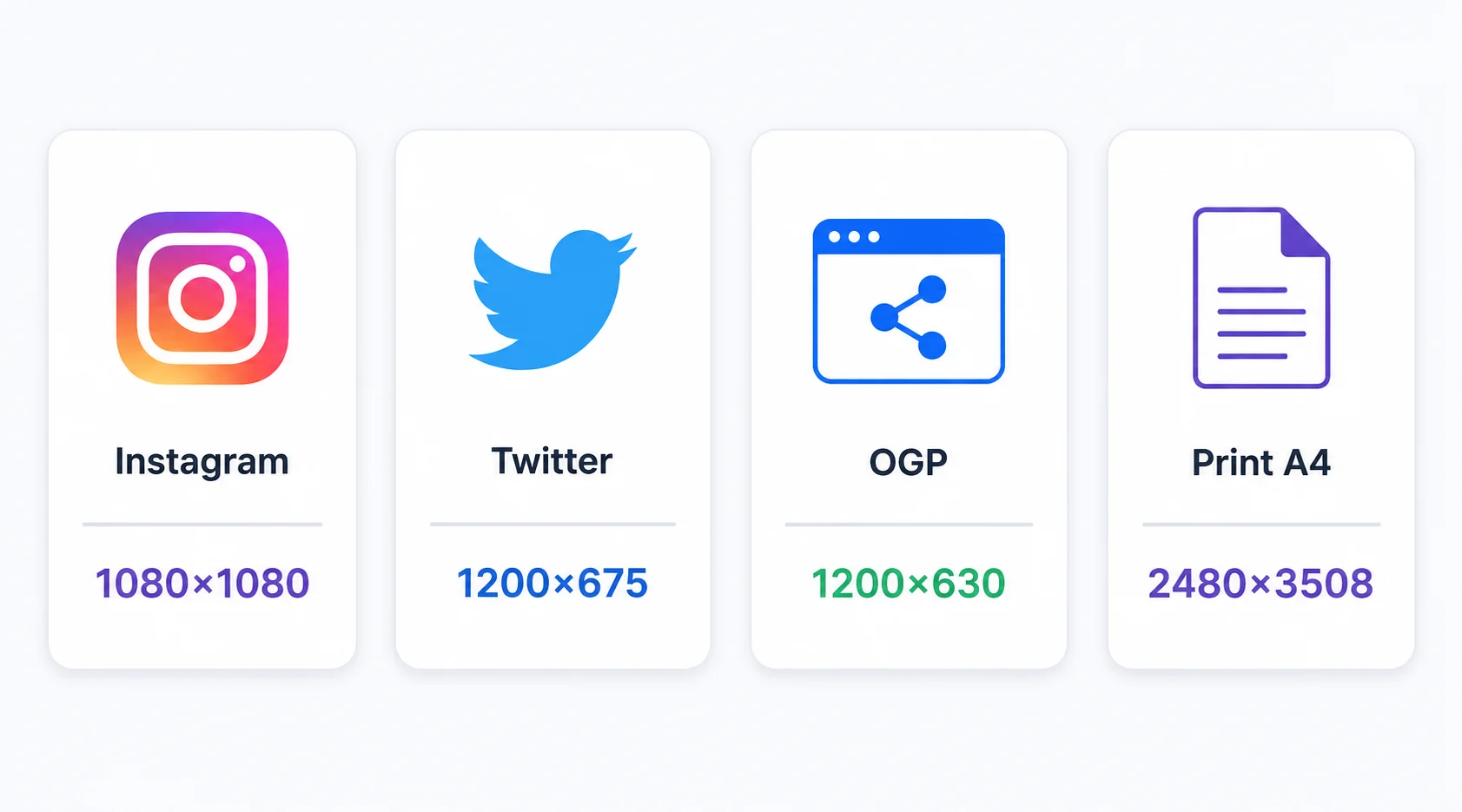
Las redes sociales tienen tamaños de imagen preferidos. Instagram cuadrado: 1080×1080px. Instagram vertical: 1080×1350px. Instagram stories: 1080×1920px. Twitter/X imagen de publicación: 1200×675px. OGP (Open Graph): 1200×630px. Ingresar estos valores en Tracelyx Resize te da una salida perfecta para la plataforma.
Para impresión, la resolución objetivo depende del tamaño de salida. Impresión estándar a 300 DPI requiere 2480×3508px para A4. Tracelyx Resize admite cualquier dimensión en píxeles.
Tracelyx Resize procesa tu imagen completamente en tu navegador usando la API Canvas HTML. Ningún archivo se sube — el redimensionado se ejecuta localmente y la salida se descarga directamente a tu dispositivo.
Esto importa para fotos confidenciales: imágenes de productos antes del anuncio, imágenes de clientes bajo NDA o fotografías personales.

Line art listo para trazar con control manual profesional, todo procesado localmente.
Abrir herramienta →
Superpón una cuadrícula precisa, fija el tamaño real e imprime a escala en hojas A4.
Abrir herramienta →
Convierte fotos en arte callejero estilo stencil en paredes reales.
Abrir herramienta →
Convierte fotos de edificios en dibujos lineales — SVG y PNG.
Abrir herramienta →
Coloca imágenes en un lienzo fijo, ajusta posición y tamaño libremente, y exporta con dimensiones exactas en píxeles. Sin subidas, sin rastreo — todo en tu navegador.
Abrir herramienta →
Reduce, controla y reutiliza los colores de una imagen con precisión — exporta a HEX, CSS, JSON, .gpl y .ase.
Abrir herramienta →
Calcula tela según puntadas, compara cuentas y añade márgenes.
Abrir herramienta →
Previsualiza fotos o dibujos como un folioscopio. Ajusta orden, tiempos e ida y vuelta.

Cualquier foto → una historia 9:16 impecable. Desenfoque, degradado, extensión y tarjeta.
Abrir herramienta →