Archivos más ligeros
Comprime imágenes para la web manteniéndolas nítidas. Archivos más pequeños significan páginas más rápidas.

Pulsa el botón Compartir y luego «Añadir a pantalla de inicio».
Reduce el peso del archivo sin cambiar casi nada en el aspecto.
Sube una foto para comprimirla. Ajusta la calidad, elige el formato de salida y elimina los datos EXIF — todo el procesamiento se realiza localmente en tu navegador.
Comprime imágenes para la web manteniéndolas nítidas. Archivos más pequeños significan páginas más rápidas.
Ajusta calidad, formato y más con controles simples. Ve la diferencia al instante.
Todo el procesamiento ocurre en tu navegador. Las imágenes nunca se suben ni salen de tu dispositivo.
Procesamiento ultrarrápido impulsado por tu propio dispositivo. No requiere subida.
Cualquier persona que trabaje con imágenes en la web — sin cuenta, sin subidas.
Reduce el peso de las imágenes antes del despliegue. Mejora Core Web Vitals y las puntuaciones de Lighthouse sin tocar la terminal.
Comprime imágenes destacadas y miniaturas antes de subirlas a WordPress u otro CMS. Mantén la calidad y reduce los costes de alojamiento.
Comparte imágenes de tu portfolio en línea sin perder detalle. Los originales nunca salen de tu dispositivo — la compresión es completamente privada.
Optimiza las fotos de productos para que las páginas carguen más rápido. Imágenes más ligeras en móvil se traducen directamente en más conversiones.
Exporta recursos con el peso adecuado para entregables o handoff. Usa el comparador antes/después para verificar la calidad antes de enviar.
Prepara imágenes para Instagram, X o LinkedIn sin subirlas a ningún servicio en la nube. Rápido, privado y solo en el navegador.
No. Todo el procesamiento ocurre en tu navegador de forma local. Tus archivos nunca abandonan tu dispositivo ni se envían a ningún servidor.
Tracelyx Compress es compatible con JPEG, PNG y WebP. También puedes convertir entre estos formatos durante la compresión.
Para la mayoría de imágenes web, una calidad de 75–85 ofrece el mejor equilibrio entre tamaño y calidad visual. Usa el comparador antes/después para juzgarlo tú mismo.
Los datos EXIF incluyen la ubicación GPS, el modelo de cámara y la hora de captura. Eliminarlos protege tu privacidad y reduce ligeramente el tamaño del archivo.
Sí, completamente gratuito. Sin cuenta, sin límites de uso y sin marcas de agua.
Esta herramienta procesa una imagen a la vez con control total de calidad. Para comprimir varios archivos en lote, usa la herramienta Batch.
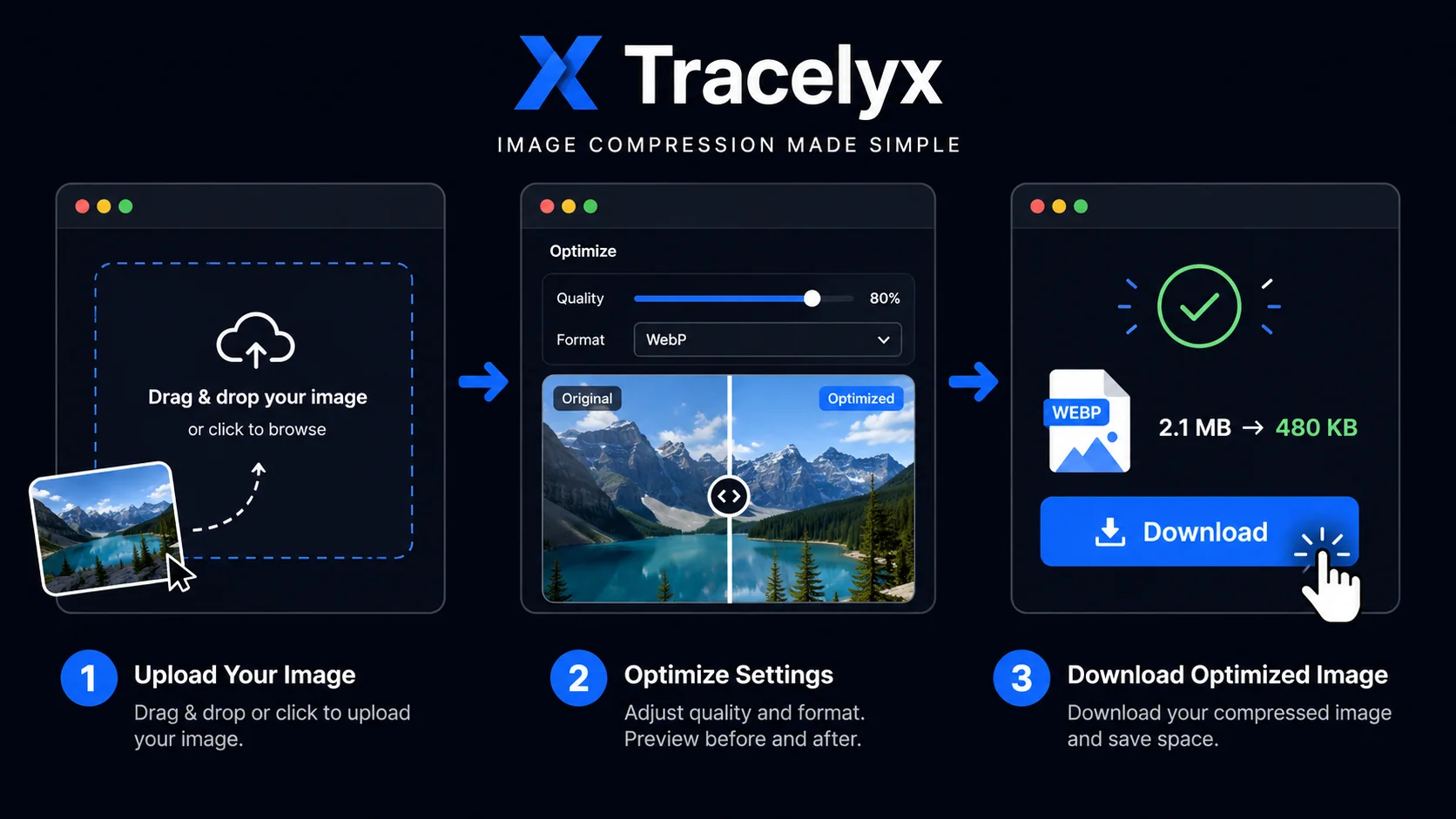
Para la mayoría de imágenes web — entradas de blog, fotos de productos, redes sociales — una calidad entre 75 y 85 ofrece el mejor equilibrio. Con calidad 80, la diferencia con el original es invisible para la mayoría de los usuarios, mientras el archivo puede ser un 60–70% más pequeño. Para portafolios fotográficos donde importan los detalles, mantén la calidad por encima de 85. Para miniaturas e imágenes de fondo, 65–75 es suficiente.
WebP produce consistentemente archivos más pequeños que JPEG con la misma calidad visual, y es compatible con todos los navegadores modernos. Si tu plataforma lo permite, elegir WebP como formato de salida es la forma más efectiva de reducir el tamaño. Para imágenes PNG con transparencia, WebP conserva el canal alfa reduciendo significativamente el tamaño comparado con PNG.
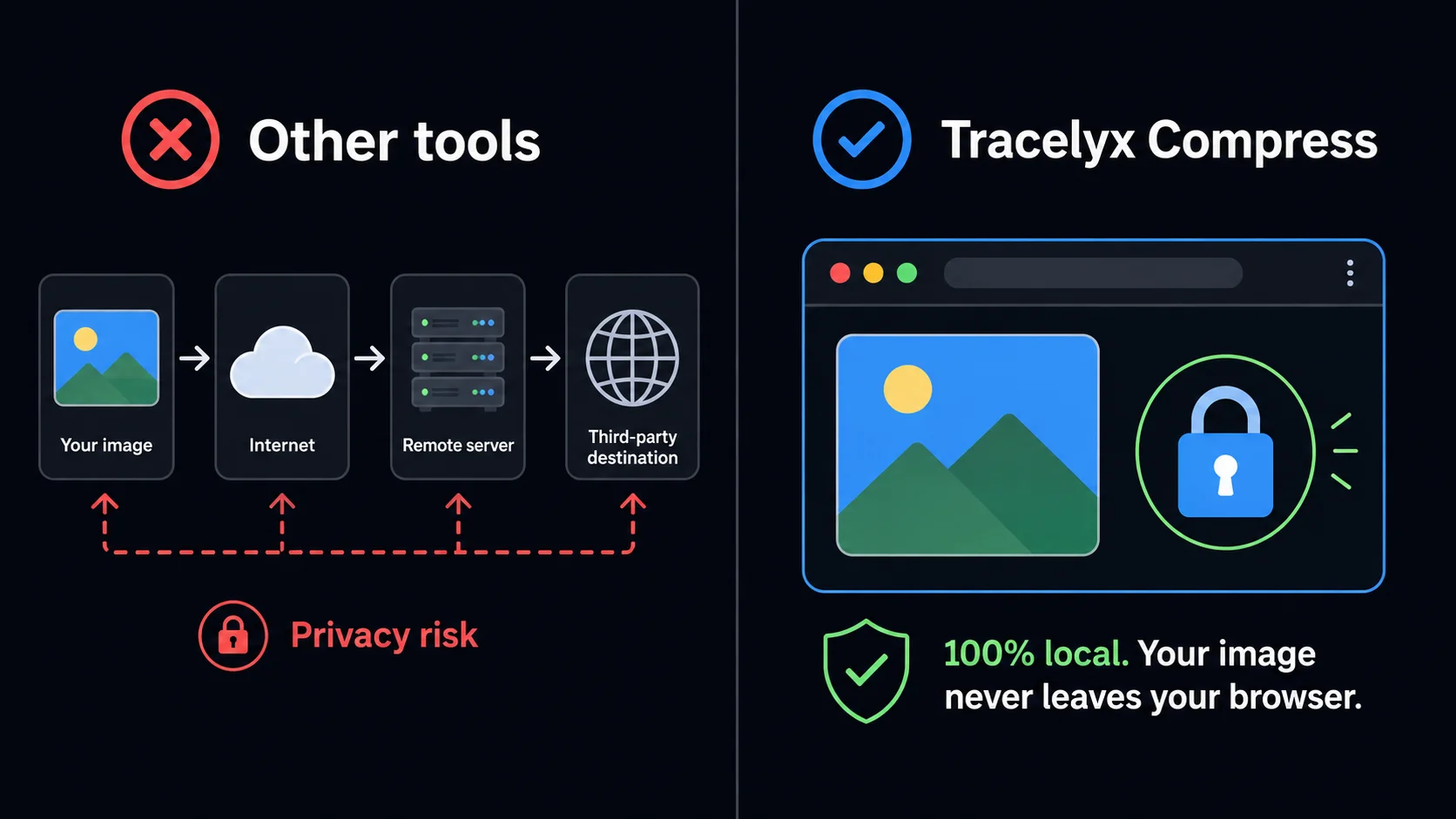
La mayoría de los compresores en línea funcionan enviando tu archivo a un servidor remoto, procesándolo allí y devolviendo el resultado. Esto significa que tu imagen — ya sea un activo privado de un cliente, una foto personal o contenido sensible — pasa por un sistema de terceros que no controlas. Tracelyx Compress funciona de manera completamente diferente: toda la compresión ocurre dentro de tu propio navegador usando la API Canvas.
Ningún dato de imagen se transmite por la red. Cuando cierras la pestaña, todo rastro de tu imagen desaparece. No hay registro de servidor, ningún almacenamiento y ninguna política de retención de datos — porque no hay datos que retener. Para fotógrafos, diseñadores y empresas que manejan activos visuales sensibles, esto no es una característica de comodidad: es una garantía de seguridad fundamental.
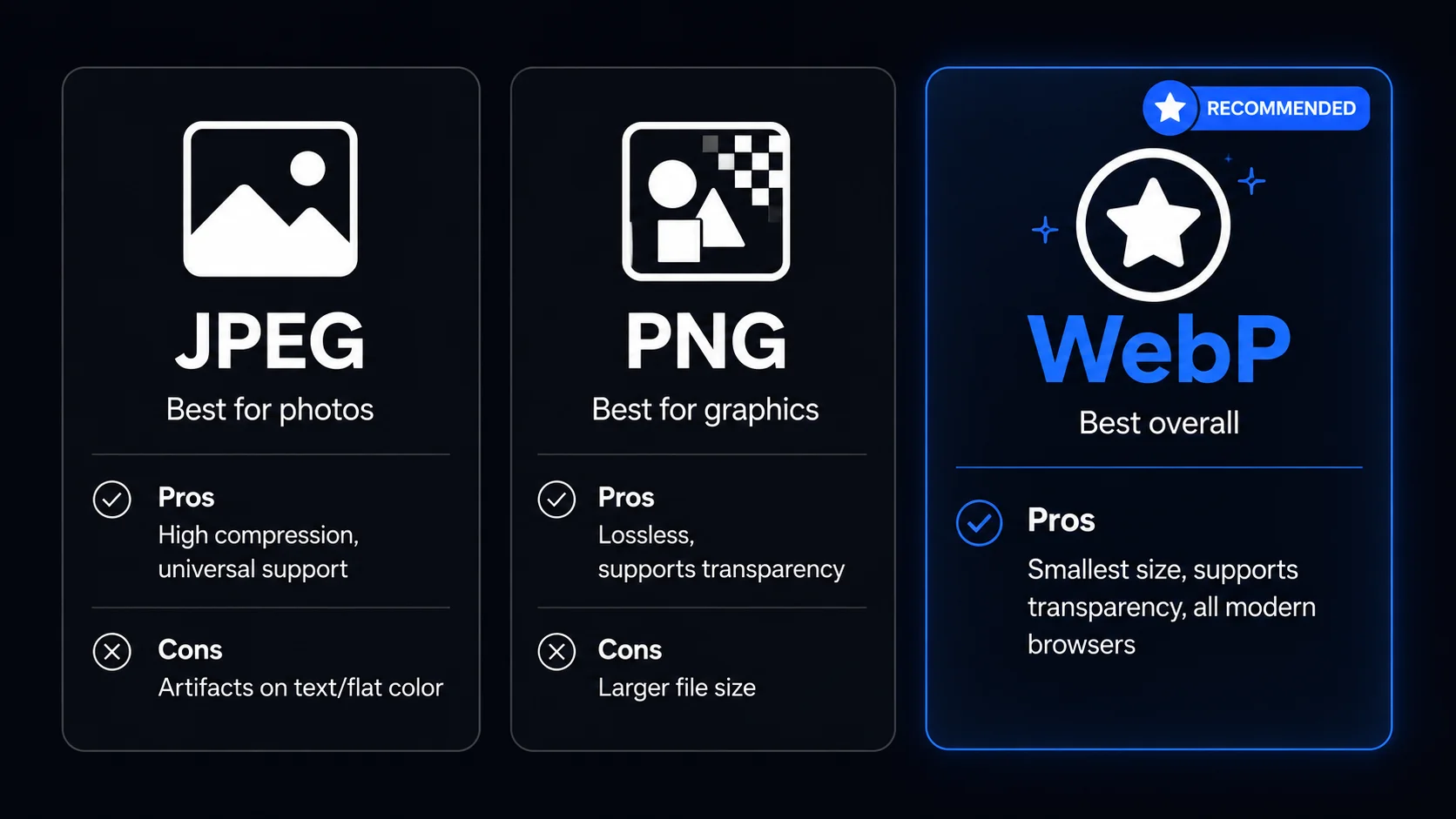
JPEG es la elección correcta para fotografías e imágenes complejas con gradientes. Logra altas tasas de compresión con mínima pérdida de calidad visible y tiene compatibilidad universal. Úsalo para imágenes destacadas, fotos de blog y fotografías de productos. Evítalo para imágenes con bordes nítidos, texto o grandes áreas de color plano — los artefactos de compresión se vuelven visibles en esos casos.
PNG es sin pérdidas y es mejor para gráficos, logotipos, capturas de pantalla e imágenes que requieren transparencia. Los tamaños de archivo son mayores que JPEG, pero no se pierde calidad. WebP combina lo mejor de ambos: maneja fotografías como JPEG y gráficos como PNG, con tamaños de archivo menores. Todos los navegadores modernos lo soportan y es ahora el formato recomendado para imágenes web.

Line art listo para trazar con control manual profesional, todo procesado localmente.
Abrir herramienta →
Superpón una cuadrícula precisa, fija el tamaño real e imprime a escala en hojas A4.
Abrir herramienta →
Convierte fotos en arte callejero estilo stencil en paredes reales.
Abrir herramienta →
Convierte fotos de edificios en dibujos lineales — SVG y PNG.
Abrir herramienta →
Coloca imágenes en un lienzo fijo, ajusta posición y tamaño libremente, y exporta con dimensiones exactas en píxeles. Sin subidas, sin rastreo — todo en tu navegador.
Abrir herramienta →
Reduce, controla y reutiliza los colores de una imagen con precisión — exporta a HEX, CSS, JSON, .gpl y .ase.
Abrir herramienta →
Calcula tela según puntadas, compara cuentas y añade márgenes.
Abrir herramienta →
Previsualiza fotos o dibujos como un folioscopio. Ajusta orden, tiempos e ida y vuelta.

Cualquier foto → una historia 9:16 impecable. Desenfoque, degradado, extensión y tarjeta.
Abrir herramienta →