Corrige fotos oscuras
Eleva las sombras y equilibra la exposición para que las fotos oscuras sean más visibles sin quemar las zonas iluminadas.

Pulsa el botón Compartir y luego «Añadir a pantalla de inicio».
Mejora la luz y el color de forma natural.
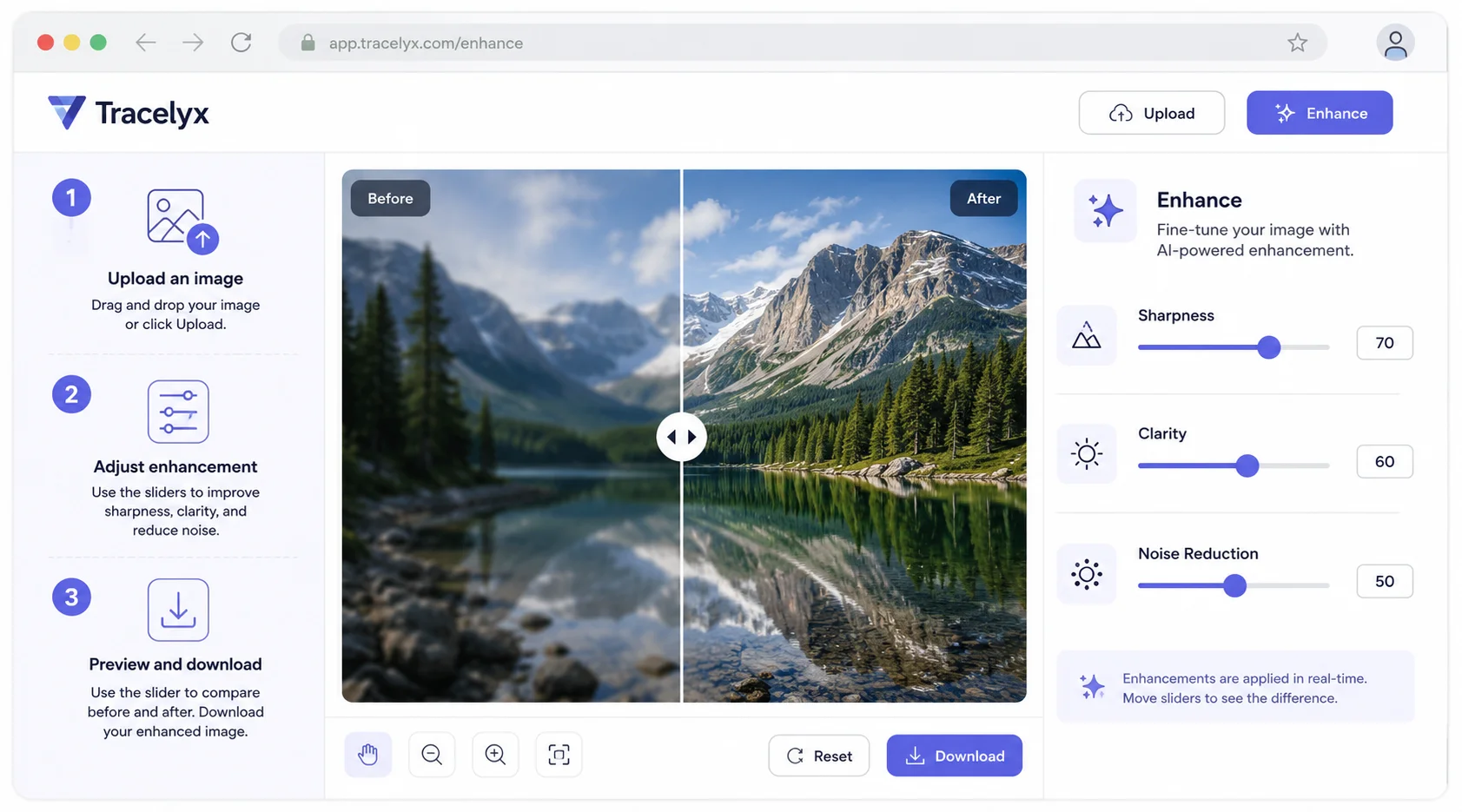
Mejora los detalles, aumenta la claridad y reduce el ruido en las fotos — con controles manuales y vista previa antes/después. Sin subida de archivos.
Eleva las sombras y equilibra la exposición para que las fotos oscuras sean más visibles sin quemar las zonas iluminadas.
Ajusta con precisión el contraste y la saturación para resaltar los detalles sin perder naturalidad.
Todo el procesamiento de la imagen se realiza directamente en tu navegador. Tus archivos no se suben a ningún servidor.

Optimiza imágenes para blogs, redes sociales o páginas de producto en segundos, sin instalar ningún software.
Cualquier persona que quiera un control preciso sobre el aspecto de sus fotos — sin apps, sin subidas.
Ajusta con precisión el brillo y la saturación de las fotos de productos para que los colores destaquen sin parecer sobreprocesados. Guarda varias versiones para comparar y elige la mejor antes de subir a tu tienda.
Ajusta el aspecto de las fotos de los artículos para que coincidan con el tono visual de tu sitio. Controla el contraste y el brillo con precisión para que cada imagen resulte consistente en tus publicaciones.
Ajusta exactamente el brillo y la saturación que deseas antes de publicar. A diferencia de las herramientas automáticas, Enhance te permite controlar cada ajuste de forma independiente para un look que sea únicamente tuyo.
Realiza correcciones rápidas de brillo y contraste en fotos suministradas por clientes antes de colocarlas en maquetaciones. Guarda varias versiones ajustadas y elige la que mejor encaje en el diseño.
Realiza ajustes de luz suaves en copias para compartir en la web sin tocar los originales. Enhance funciona íntegramente en el navegador — tus archivos maestros permanecen seguros en tu dispositivo.
Mejora imágenes para presentaciones, informes y anuncios sociales. Ajusta el brillo y el contraste para garantizar un aspecto profesional en todas las pantallas y formatos de salida.
No. Todo el procesamiento ocurre en tu navegador de forma local. Tus archivos nunca abandonan tu dispositivo ni se envían a ningún servidor.
Puedes ajustar la intensidad de mejora, el brillo, el contraste y la saturación individualmente con controles deslizantes. Cada ajuste actualiza la vista previa en tiempo real para que puedas ver el efecto antes de descargar.
AutoFix aplica un único ajuste automático sin intervención manual. Enhance te da control total con controles individuales para brillo, contraste, saturación e intensidad de mejora — y te permite guardar varias versiones para comparar.
Sí. Usa el botón Guardar esta versión para almacenar una instantánea de tu configuración actual. Puedes crear varias versiones con diferentes ajustes y descargar la que prefieras.
Sí, completamente gratuito. Sin cuenta, sin límites de uso y sin marcas de agua.
Tracelyx Enhance admite JPEG, PNG y WebP como formatos de entrada.
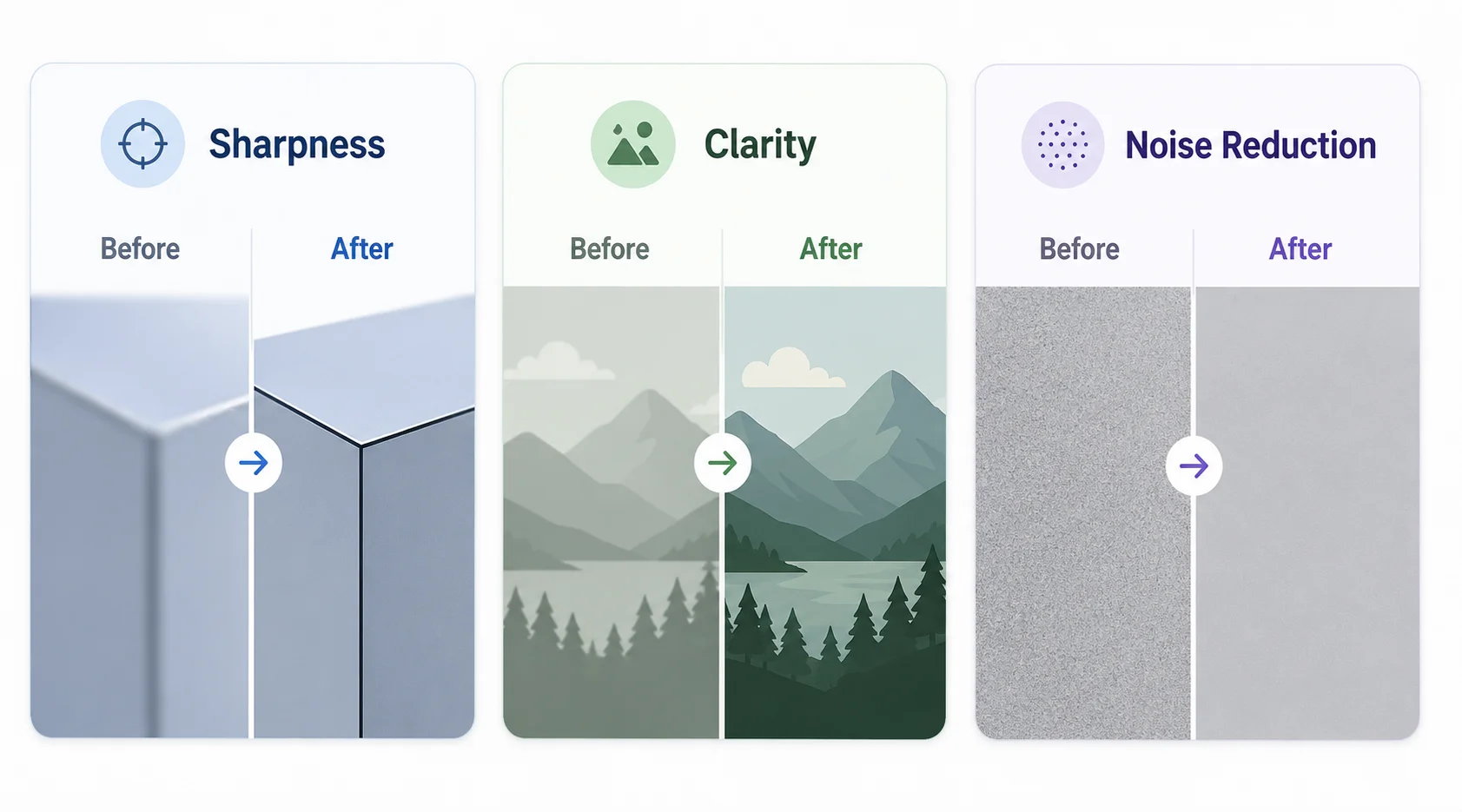
La Nitidez mejora el contraste de bordes — los límites entre áreas claras y oscuras donde el ojo percibe los detalles. Aumentar la nitidez hace que el texto, el cabello, la textura de la tela y las líneas finas se vean más nítidos. Ten cuidado con valores muy altos en retratos — enfocar los poros y el vello facial puede hacer que la piel se vea áspera.
La Claridad es un ajuste de contraste de tonos medios. A diferencia de la nitidez, que apunta a bordes finos, la claridad levanta el contraste en el rango medio de tonos — dando estructura a áreas planas o brumosas. La Reducción de ruido suaviza la variación de píxeles causada por el ruido del sensor de la cámara. Úsala antes del enfoque o en niveles moderados combinados.
Tracelyx Enhance procesa tu imagen completamente dentro de tu navegador usando JavaScript y la API Canvas. Nada se sube — la mejora se ejecuta localmente en tu dispositivo.
Esto importa para fotos de clientes, imágenes de productos confidenciales y fotografías personales que no querrías subir a un servicio en la nube. La herramienta funciona completamente sin conexión una vez cargada la página.

Line art listo para trazar con control manual profesional, todo procesado localmente.
Abrir herramienta →
Superpón una cuadrícula precisa, fija el tamaño real e imprime a escala en hojas A4.
Abrir herramienta →
Convierte fotos en arte callejero estilo stencil en paredes reales.
Abrir herramienta →
Convierte fotos de edificios en dibujos lineales — SVG y PNG.
Abrir herramienta →
Coloca imágenes en un lienzo fijo, ajusta posición y tamaño libremente, y exporta con dimensiones exactas en píxeles. Sin subidas, sin rastreo — todo en tu navegador.
Abrir herramienta →
Reduce, controla y reutiliza los colores de una imagen con precisión — exporta a HEX, CSS, JSON, .gpl y .ase.
Abrir herramienta →
Calcula tela según puntadas, compara cuentas y añade márgenes.
Abrir herramienta →
Previsualiza fotos o dibujos como un folioscopio. Ajusta orden, tiempos e ida y vuelta.

Cualquier foto → una historia 9:16 impecable. Desenfoque, degradado, extensión y tarjeta.
Abrir herramienta →