Precise resizing
Resize any image by width, height, or exact pixels. Maintain perfect proportions with automatic aspect ratio locking.
Tap the Share button, then “Add to Home Screen”.
Resize images for the web without losing clarity. Set exact pixels or fit within a max width and height — all in your browser.
Resize images to exact pixel dimensions or by percentage — with aspect ratio lock and optional sharpening. No upload required.
Resize any image by width, height, or exact pixels. Maintain perfect proportions with automatic aspect ratio locking.
Resized images stay crisp and clean. Perfect for thumbnails, banners, or product photos.
Everything runs inside your browser. Your images never upload, never leave your device, and remain 100% private.
Powered by native browser rendering for instant results. No waiting, no server processing.
Anyone who needs images at the right size — no app, no upload.
Adjust images to exact pixel widths before deploying to production. Set a max-width and the aspect ratio is preserved automatically — no image editing software required.
Resize header images and thumbnails to match your CMS upload requirements. Consistent image sizes improve your layout and page loading speed.
Standardize product image dimensions across your entire catalog. Consistent sizes create a professional storefront layout and improve mobile load times.
Export assets at specific pixel dimensions for handoff, mockups, and presentations. The Exact size mode handles precise pixel requirements every time.
Resize images to platform-specific dimensions for Instagram, Twitter, LinkedIn, and more. Get pixel-perfect output for every social media format.
Prepare images for internal documents, presentations, and email communications at required dimensions. No software installation needed.
No. All resizing happens entirely in your browser. Your files never leave your device and are never sent to any server.
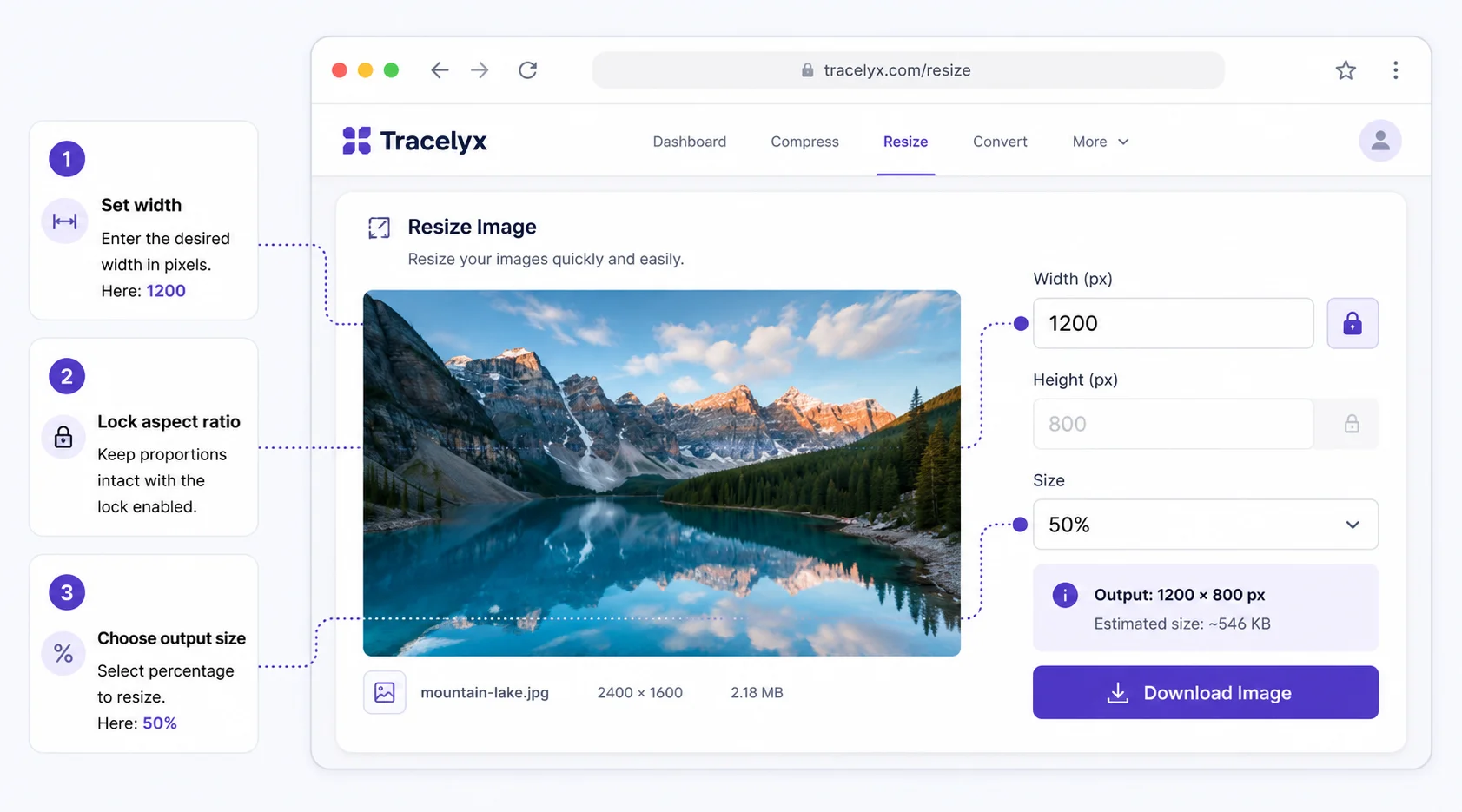
Enter the target width, height, or both. Enable Lock Aspect Ratio to maintain proportions automatically. You can also enter a percentage to scale by a fixed factor.
Enable Lock Aspect Ratio before entering your target dimension. The tool automatically calculates the other dimension to keep the original proportions.
Yes, completely free. No account required, no usage limits, no watermarks.
Tracelyx Resize supports JPEG, PNG, and WebP as output formats. You can also choose the format that works best for your use case.
This tool processes one image at a time with full control over dimensions. For batch resizing of multiple files, use the Batch tool.
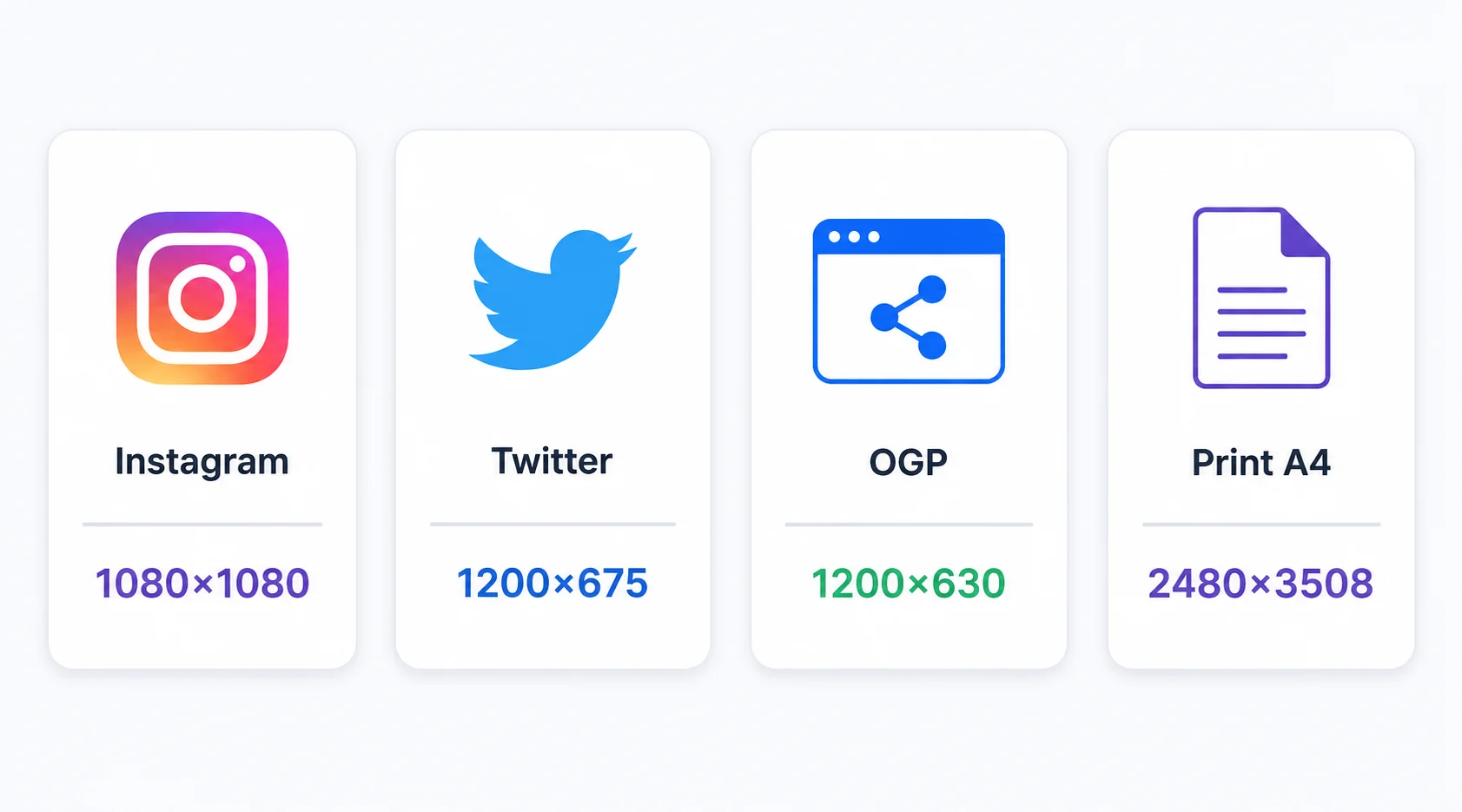
Social media platforms each have preferred image sizes. Twitter and X work best with 1200×675px for link cards and 1500×500px for headers. Instagram supports square images at 1080×1080px and portrait at 1080×1350px. LinkedIn article images perform well at 1200×627px. Email campaigns typically use 600px-wide images to display correctly in common clients. Entering these values in Tracelyx Resize gives you a pixel-perfect output for the platform.
For print, the target resolution depends on the output size and printing method. Standard print at 300 DPI requires 2480×3508px for A4, and 3508×4961px for A3. If you know the DPI and print size, multiply them to get the pixel count you need. Tracelyx Resize handles any pixel dimension — there is no maximum.
Tracelyx Resize processes your image entirely in your browser using the HTML Canvas API. No file is uploaded — the resize operation runs locally, and the output is downloaded directly to your device. Your image never touches a Tracelyx server.
This matters when you are resizing confidential images: product photos before announcement, client images under NDA, medical images, or personal photographs. No cloud service sees your file — it stays on your device throughout the entire process.