Private by design
TraceGrid — a precise transfer grid overlaid on a drawing, ready to print to scale
Precision tool

Overlay a grid. Print to exact scale.

Drop a photo or line drawing, lay a precise grid over it, set the finished real-world size to read off the exact cell dimensions, then export a PNG, a print-ready tiled PDF, or print straight across multiple A4 sheets.

Start now
Drop an image here, or click to choose You can also paste from the clipboard
Cell size (real)
PNG resolution
Print layout

Grid divisions

Columns × Rows ×

Cell numbering

Format
Placement

Line style

Color
Width 0.30mm
Opacity 90%

Tracing aids

Underlay 100%

Lower the underlay to print a faint base for tracing.

Finished size & resolution

Width × Height ×
Output DPI

Tiled printing

Paper
Margin (mm) Overlap (mm)

Pages overlap by the glue margin and carry corner registration marks.

Export

To print at true size, set your printer to "Actual size" / 100% (turn off "Fit to page" or "Scale to fit"). Verify by measuring one cell against the displayed size.

Who uses TraceGrid?

Anyone enlarging or transferring an image by hand — accurately, at a known scale.

Artists & Muralists

Enlarge a reference onto canvas or a wall with the grid method. Set the finished size, read the exact cell dimensions, and tile across sheets for large murals.

Cross-stitch & Crafts

Turn a picture into a numbered chart grid for cross-stitch, beading, or pixel patterns, with A1-style coordinates to keep your place.

Students & Hobbyists

Practise observational drawing with a clean grid overlay, mirror the image to check proportions, and print a faint underlay to trace.

Frequently Asked Questions

Is my image uploaded anywhere?

No. The image is processed entirely in your browser using the Canvas API. It is never sent to any server, and closing the tab discards it.

How is the real cell size calculated?

It is pure arithmetic: cell width = finished width ÷ columns, cell height = finished height ÷ rows. The value shown matches a hand calculation exactly — for example, 300mm across 10 columns gives 30.0mm cells.

What happens when the finished size is larger than A4?

TraceGrid automatically splits the design across multiple pages, showing the total page count and the column × row layout. Each page includes a glue/overlap margin (5mm by default) and corner registration marks so you can align and tape the sheets.

What can I export?

A high-resolution PNG of the whole design, a print-ready tiled PDF with one paper sheet per page, or you can print directly from the browser. All three share the same exact grid math, so there is no drift between them.

Does it edit or trace the image for me?

No — TraceGrid only overlays the grid and handles sizing and tiling. To turn a photo into clean line art first, use TraceLine, then bring the result here.

From photo to finished transfer

Photo TraceLine TraceGrid Print & transfer

1 · Set the grid and the real size

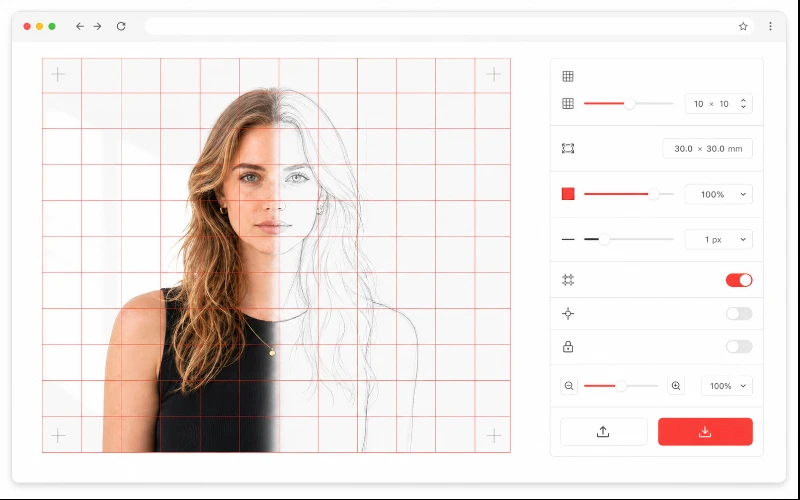
TraceGrid: a precise grid overlaid on an image with the exact real-world cell size shown

Drop your image, choose the number of columns and rows (or a preset), and enter the finished width and height in mm or cm. TraceGrid shows the exact size of one cell so the proportions on your canvas, wall, or fabric stay true. Turn on "keep cells square" to auto-adjust the rows to your image's proportions.

2 · Number the cells and add tracing aids

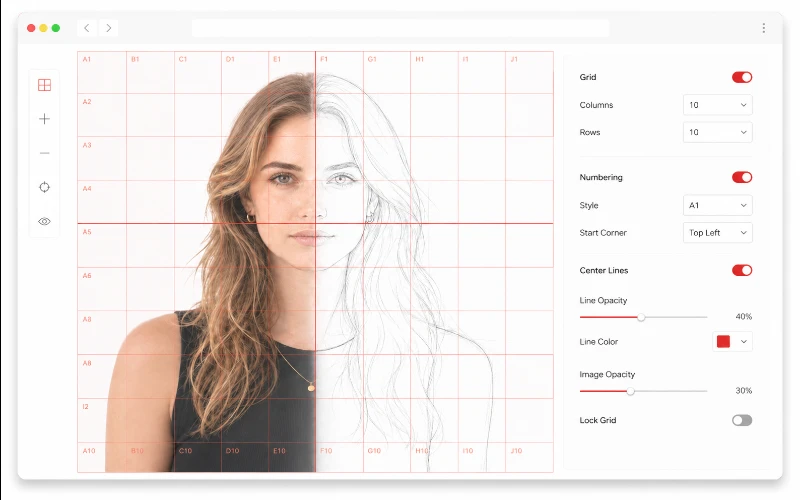
Numbered grid cells with A1 labels, center cross, mirror and faint underlay options

Switch on numeric (1, 2, 3…) or A1-style numbering, placed inside the cells or as edge labels, to keep your place while transferring. Add a center cross or diagonals as alignment guides, mirror the image for mirror-copying, and lower the underlay opacity to print a faint base you can trace over.

3 · Print to scale across A4 (or any paper)

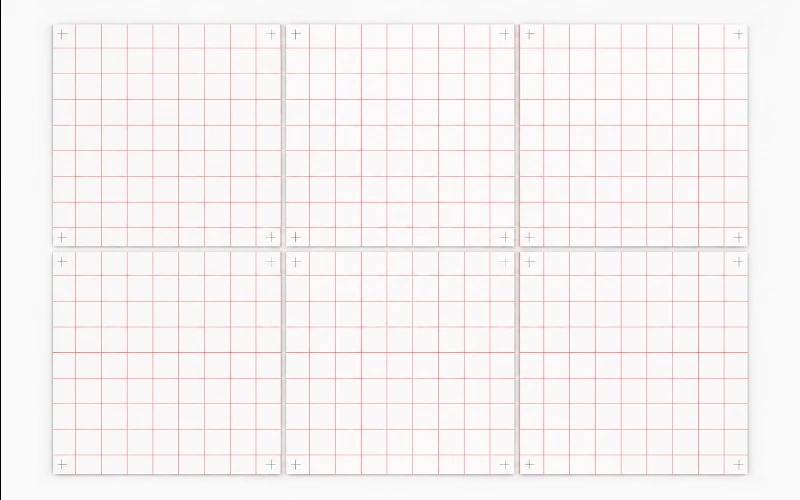
A large gridded design tiled across multiple A4 sheets with overlap margins and corner registration marks

When the finished size is bigger than your paper, TraceGrid tiles it automatically. Each sheet carries a glue/overlap margin and corner marks, and the panel tells you how many pages and the column × row layout. Download a tiled PDF for clean printing, export a high-resolution PNG, or print straight from the browser — every route uses the same precise measurements.