

写真を、印刷できるドット設計図に
画像をドット化してきれいな色数まで減色し、番号付きの設計図をA4タイル割で書き出し。クロスステッチ・ビーズ・アイロンビーズの図案にそのまま使えます。レトロなドット絵PNGへの切り替えもワンタッチ。すべてブラウザ内で動作します。
今すぐ試すAIなし。正確なアルゴリズムによるドット化と減色。画像がアップロードされることはありません。
出力
マスの色
色数
メディアンカット量子化で、最も代表的な色を選びます。
ディザリング
PatternClean
刺しやすい図案に整えます。補正案を確認してから適用できます。
孤立マスは上下左右の3マス以上が同色の場合だけ補正し、端や透明部分に接するマスは残します。近似色は指定したRGB距離以内で最も近い1組を、使用数の多い色へ統合します。RGB距離は実際の糸色の一致度ではありません。
目や光など、必要な細部も候補になることがあります。必ずプレビューで確認してください。画像・解像度・色数・サンプリング・ディザを変えると図案を作り直し、補正と取り消し履歴は消えます。戻せるのは直前の補正1回です。
設計図の表示
このマスサイズでA4に割り付けて印刷します。のりしろ余白とトンボ付きで、用紙をまたいで貼り合わせられます。
色の凡例
書き出し
PixelForge の使いどころ
画像を色つきマスのグリッドに変えるすべての人へ ― 作るためにも、遊ぶためにも。
クロスステッチ・ビーズ・アイロンビーズ
写真を、色の凡例と10マスごとの太いガイド線付きの番号入り図案に変換。A4タイル割で印刷して、1マスずつ進められます。
ドット絵・ゲーム制作
図案からレトロドットモードに切り替えれば、指定色数・ディザ込みの、輪郭のくっきりしたドット絵PNGに。
モザイク・壁面プロジェクト
決まったパレットと正確なマス目から、タイルモザイク・付箋アート・塗り絵壁画を計画。原寸で印刷できます。
よくある質問
画像はサーバーにアップロードされますか?
いいえ。ドット化と減色は Canvas API を使ってブラウザ内だけで行われます。画像がサーバーへ送信されることはなく、タブを閉じれば破棄されます。
2つのモードの違いは?
どちらも同じドット化・減色を共有します。設計図モードは番号付きグリッドと色の凡例を加え、印刷向けのA4タイル割PDFまたは設計図PNGを書き出します。レトロドットモードはグリッドと番号を隠し、輪郭のくっきりしたドット絵PNGを書き出します。
色はどう選ばれますか?
PixelForge は PaletteForge と同じメディアンカット量子化を再利用し、指定した色数で代表的なパレットを選びます。任意で Floyd–Steinberg やオーダードディザも使えます。設計図はベタ塗りが読みやすいため、ディザは既定でオフです。
印刷用の図案はどうやってA4に収まりますか?
1マスの印刷サイズをミリ単位で指定します。PixelForge は必要な枚数のA4に図案を割り付け、のりしろ余白・四隅のトンボ・色の凡例ページを付けます。TraceGrid と同じタイル割の方式です。
PixelForge は無料ですか?
はい、完全無料です。アカウント登録・利用回数の制限・ウォーターマークはありません。
PixelForge の使い方
写真から図案まで3ステップ
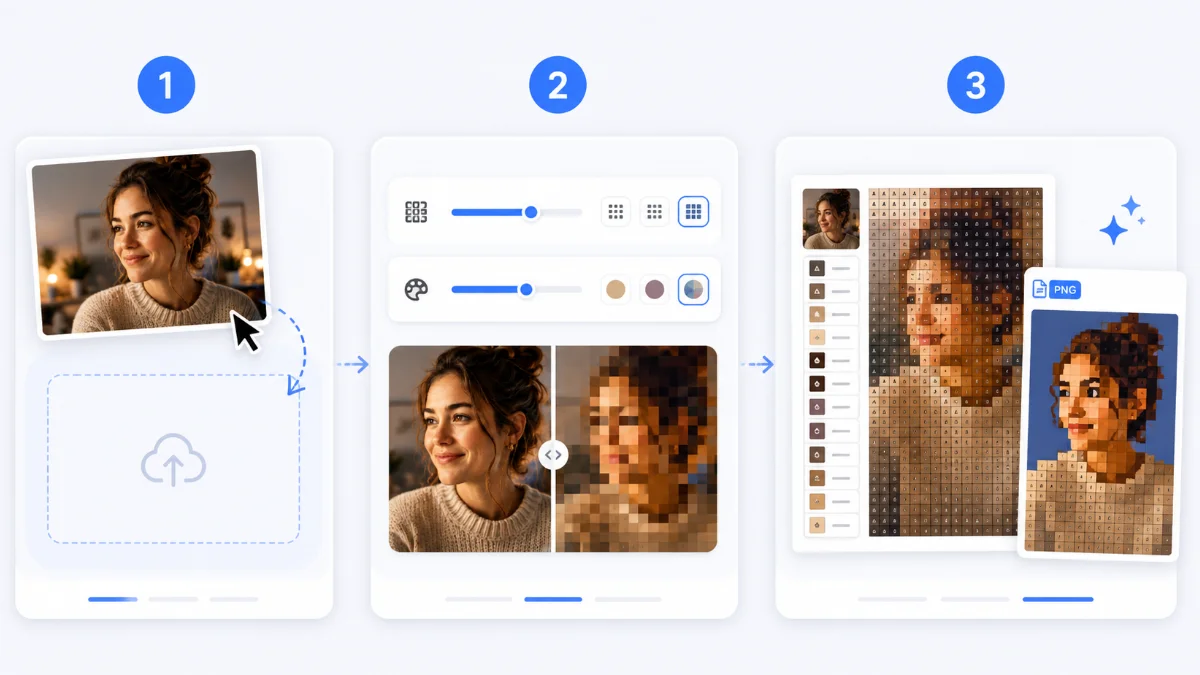
- 画像を読み込み ― ファイルをドロップ・選択・貼り付け。アップロードはなく、処理はすべてローカルです。
- ドット解像度と色数を設定し、スライダーで元画像と結果を見比べます。ディザリングは任意です。
- 「設計図」のままなら番号付きの印刷用A4 PDFと凡例を、「レトロドット」に切り替えればきれいなゲーム風PNGを書き出せます。
1つのエンジン、2つの出力
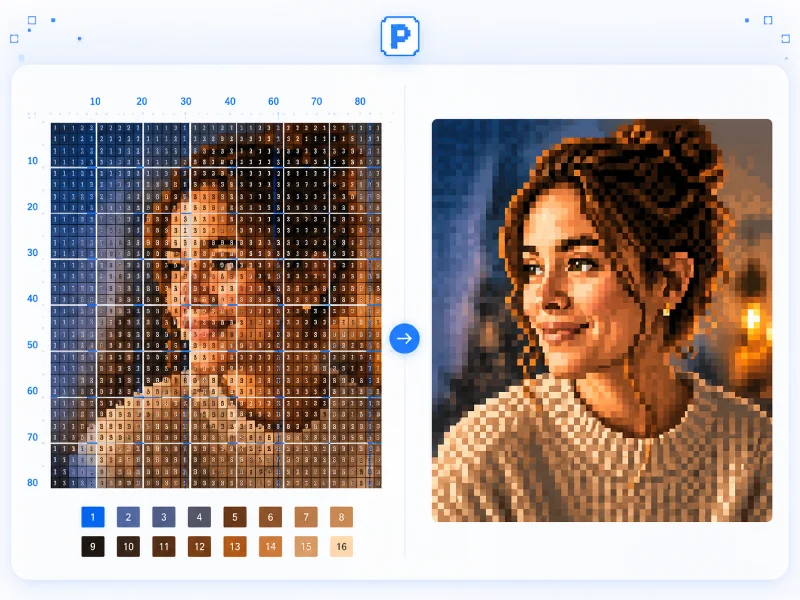
PixelForge は単一のパイプライン(マスへのダウンサンプル → 正確なパレットへの減色)を実行し、その結果を2通りで見せます。主役は設計図モード:原寸印刷できる番号付きグリッドと色の凡例で、クロスステッチ・ビーズ・アイロンビーズ・タイルモザイク向けです。レトロドットモードは同じドットからグリッドと番号を取り除き、くっきりしたゲーム風PNGとして書き出します。
どちらのモードも同じ減色結果から生まれるため、切り替えても色やレイアウトは変わりません。変わるのは見せ方と書き出し方だけ。一度仕上げれば、壁にも画面にもそのまま持っていけます。
解像度と色のコントロール
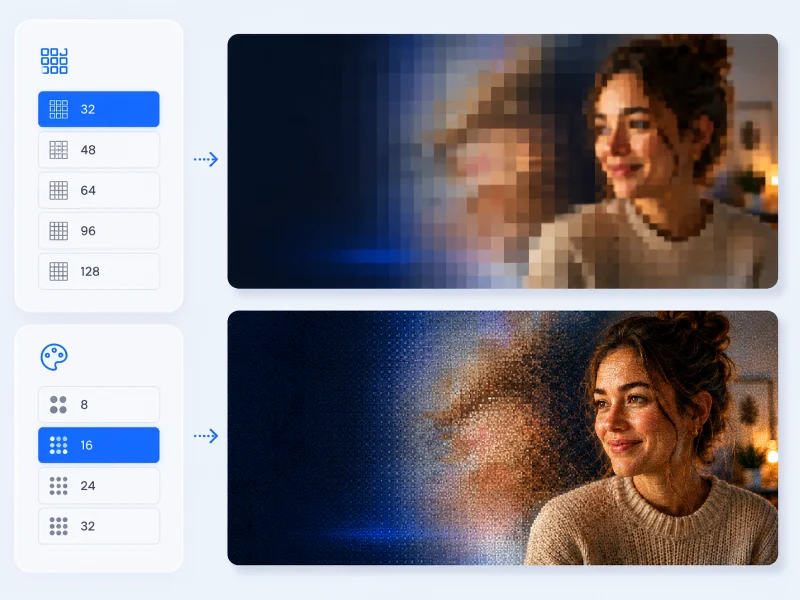
横に並ぶマス数を選びます ― ざっくりした32から、緻密な128、または任意の値まで。縦は画像の比率に合わせて自動で決まります。各マスの色の決め方も選べます:写真向きでなめらかな「平均」か、輪郭がくっきりして平坦になる「中央値」。そのうえで 8・16・24・32、または2〜256の任意の色数にメディアンカットで減色します。
設計図がベタ塗りで読みやすいよう、ディザリングは既定でオフですが、なめらかなグラデーションやあえてレトロな粒状感が欲しいときは Floyd–Steinberg やオーダードBayer がワンクリックで使えます。変更はすべてビフォー/アフタースライダーに即座に反映されます。
PatternClean
刺しやすい図案に整えます。補正案を確認してから適用できます。
孤立マスは上下左右の3マス以上が同色の場合だけ補正し、端や透明部分に接するマスは残します。近似色は指定したRGB距離以内で最も近い1組を、使用数の多い色へ統合します。RGB距離は実際の糸色の一致度ではありません。
目や光など、必要な細部も候補になることがあります。必ずプレビューで確認してください。画像・解像度・色数・サンプリング・ディザを変えると図案を作り直し、補正と取り消し履歴は消えます。戻せるのは直前の補正1回です。
A4タイル割で印刷可能
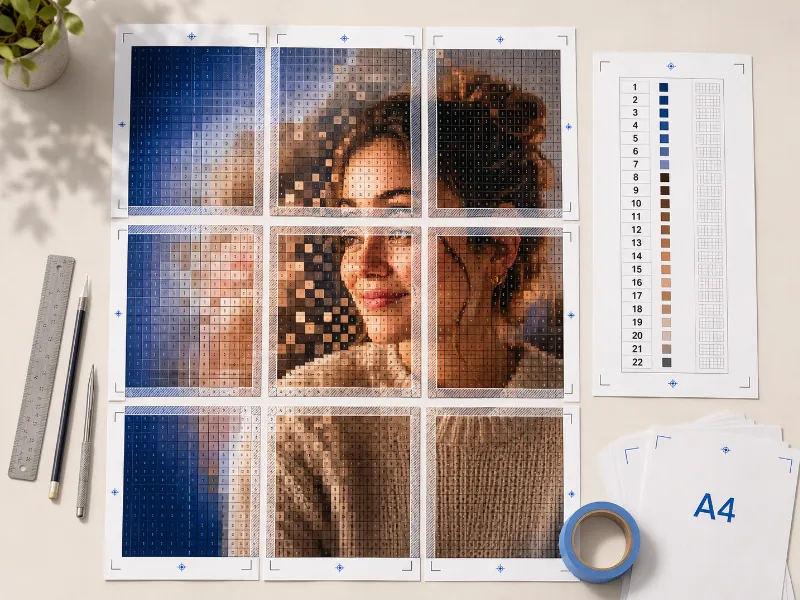
1マスの印刷サイズをミリ単位で指定すると、PixelForge は必要な枚数のA4に図案を割り付けます。のりしろ余白と四隅のトンボ付きで、用紙をきれいに貼り合わせられます。10マスごとの太いガイド線で位置を見失わず、色の凡例ページには各番号・HEX値・使用マス数が並びます。
印刷用PDF・1枚の高解像度設計図PNG、またはレトロドットモードでのきれいなドット絵PNGを書き出せます。タイル割の計算は TraceGrid と同じなので、印刷の縮尺は正確です。
プライバシー:画像は端末から出ません

PixelForge は Canvas API を使ってブラウザ内だけで画像を処理します。ファイルはサーバーへ送信されないため、未公開・機密のアートワークでも安全に扱えます。ページを再読み込みすればすべて消え、どこにも送信されません。








